You verified your new website in Google Search Console, opened the dashboard, and found an empty report with a “Processing data” message. That is normal, and it does not mean something is broken.
The short answer: most new sites see their first Search Console data within 2 to 7 days after verification. Performance data (clicks and impressions) only appears once Google has crawled, indexed, and shown your pages in search results. If your site has no impressions yet, some reports can stay empty for several weeks.
This guide explains exactly what happens behind the scenes, what a realistic timeline looks like, why your data might be missing, and what you can do to speed things up.
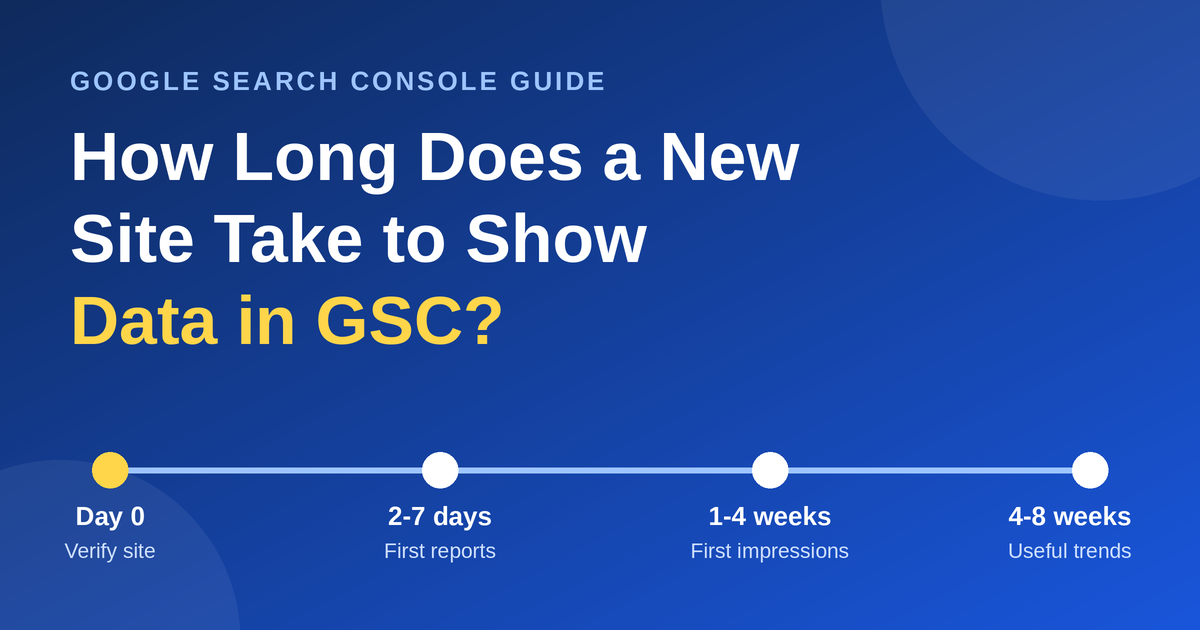
Quick Timeline: When Will Your GSC Data Appear?
| Stage | Typical wait | What you will see |
|---|---|---|
| Right after verification | Immediately | A “Processing data, please check again in a day or so” message |
| First reports populate | 2 to 7 days | Basic reports such as sitemaps and indexing begin to fill |
| First impressions and clicks | 1 to 4 weeks | Performance report starts showing queries and pages |
| Stable, useful data | 4 to 8 weeks | Enough volume to spot trends and opportunities |
These ranges are practical estimates, not guarantees. A site with strong internal linking, a submitted sitemap, and quality content moves faster than one with a single page and no links.
Why Search Console Does Not Show Data Instantly
Search Console is not a live dashboard. It reports on how your site appears in Google Search, and for that to exist, three things must happen first.
1. Google must discover your pages. Google finds new URLs through sitemaps and links from other pages. According to Google’s own timing data shared by Gary Illyes and reported by Search Engine Roundtable, discovery of a new URL typically takes about 20 hours, but the slowest cases stretch to weeks or never.
2. Google must index them. Crawling and indexing are separate steps. Google’s documentation says crawling can take anywhere from a few days to a few weeks, and that requesting a crawl does not guarantee inclusion in search results.
3. Your pages must appear in results. Performance data is built from impressions. If nobody has been shown your page in search, there is nothing to report. This is the most common reason a brand-new site shows empty charts even after the “processing” message disappears.
Because these stages depend on each other, delays stack up. A page cannot be indexed before it is crawled, and it cannot earn impressions before it is indexed.
What “Processing Data” Actually Means
When you first add a property, Search Console shows a message that it is still processing data. Google collects this data in batches rather than in real time, so a short wait is built into the system.
For most sites this clears within a few days. Industry sources report roughly 3 to 7 days as typical, and some older sites that add verification later see data within about 24 hours.
If the message sticks around much longer, the usual reason is simply a lack of search activity. Reports that depend on search traffic stay empty until there is something to report. It is not necessarily a technical fault.
Different Reports Update at Different Speeds
Not every report in Search Console runs on the same schedule.
- Performance report: updates frequently, but there is usually a delay of a couple of days before the newest numbers show.
- Page indexing report: updates as Google crawls and processes your URLs, so it can lag behind your actual changes.
- URL Inspection tool: fetches information when you request it, so it is the fastest way to check a single page.
- Links report: updates much less often, sometimes only every few weeks.
If you are checking a report and it looks outdated, remember that each one has its own refresh rhythm.
Important: Search Console Does Not Collect Past Data
This surprises many site owners. Search Console only starts recording data after your property is verified. If your site has been live for a year but you only verified it today, the previous year of search data does not exist in your account, and nobody can add it back.
The same gap appears if verification is removed and re-added later, or if a site changes hands and the old owner’s access is deleted before the new one is set up. Verify your property as early as possible, ideally before you publish your first page.
9 Reasons Your New Site Still Shows No Data
If a week or two has passed and your reports are still empty, check this list.
- Verification is incomplete or was removed. Confirm the property still shows as verified. Deleting the verification file, meta tag, or DNS record can cut off access.
- Google has not crawled the site yet. A new site with no links pointing to it can be discovered slowly.
- Your pages are not indexed. Check the Page indexing report and use URL Inspection on your key pages.
- robots.txt or a noindex tag is blocking Google. This is common on sites built in a staging mode, especially WordPress sites with “Discourage search engines” ticked in Reading settings.
- You added the wrong property. HTTP, HTTPS, www, and non-www versions count as separate URL-prefix properties. A Domain property covers all of them.
- You are applying filters. A narrow date range, country, or query filter can make the chart look empty.
- There are no impressions yet. Indexed pages that rank far down the results can show zero or near-zero data.
- You lack permissions. Restricted users do not see everything an owner sees.
- A recent site change. Moving domains, changing URL structure, or switching to HTTPS means Google has to recrawl before data settles.
How to Speed Up Data in Google Search Console
You cannot force Google to process data faster, but you can remove the obstacles.
Verify a Domain property immediately. It covers every version of your URL and avoids the wrong-property problem.
Submit your XML sitemap. Google’s documentation recommends sitemaps for sites with many URLs and notes they are especially helpful just after launch. In WordPress, plugins such as Yoast SEO, Rank Math, or the built-in sitemap generate one automatically.
Request indexing for your most important pages. Use the URL Inspection tool for your homepage and a handful of key posts. There is a quota, and Google states that requesting a recrawl of the same URL repeatedly will not make it happen faster, so avoid resubmitting.
Build internal links. Link new posts from your homepage, menus, and related articles so Googlebot can follow a clear path.
Get a few real visitors and links. Share new posts on social platforms, communities, and relevant directories. Even a small amount of external discovery helps Google find the site sooner.
Check that nothing blocks crawling. Review your robots.txt file and your page-level robots settings before assuming the data is delayed.
Publish useful content consistently. Google prioritizes fast inclusion of high-quality, helpful pages. Thin or duplicated pages are the ones that stay “Discovered, currently not indexed” the longest.
What to Do While You Wait
Waiting does not have to mean doing nothing.
- Publish your first 8 to 10 quality posts.
- Set up Google Analytics so you can see visitor behavior independently.
- Check your site speed and mobile layout with PageSpeed Insights.
- Add a clear site structure with categories, an About page, and a Contact page.
- Use the URL Inspection tool’s live test to confirm Google can fetch your pages.
Frequently Asked Questions
How long does it take to index a new website?
Most new pages are discovered within a day or two and indexed within a few days to a few weeks. Google says crawling can take anywhere from a few days to a few weeks, and some pages are never indexed if Google judges them low in quality or usefulness.
How often does GSC update?
Search Console does not update in real time. Performance data is typically refreshed daily with a short lag, while other reports, such as links, update far less often. Treat it as a near-daily report, not a live one.
How long does a new website take to show up on Google?
Your site can appear in results for its own name within days, but ranking for competitive keywords takes months. Showing up and ranking well are two different milestones.
How long does it take for data to show up in Google Analytics?
Google Analytics works differently. Real-time reports show activity within seconds, and standard reports can take roughly 24 to 48 hours to fully populate. This is why Analytics often shows visitors before Search Console shows any search data.
Can I get historical data in Search Console for a new property?
No. Data is collected only from the moment of verification, so older periods will remain blank.
Why does my GSC show impressions but no clicks?
Your pages are appearing in results but ranking too low or earning too little attention. Improve the title and meta description, and strengthen the content for the queries you are targeting.
Final Thoughts
Waiting for your first Search Console data is a normal part of launching a site. Expect the initial “processing” phase to clear in under a week, and the first meaningful performance data to arrive within the first few weeks, depending on how quickly Google crawls, indexes, and shows your pages.
Verify early, submit a sitemap, link your pages together, and keep publishing helpful content. Those habits shorten the wait more than any trick will.