A few years ago, searching meant typing a few keywords into a box. Today you can point your phone at a pair of shoes, hum a tune, ask a spoken question, or upload a screenshot, and still get a useful answer. This shift is called multimodal search, and it is changing how people find information and how websites get discovered.
This guide explains what multimodal search is, how Google Lens and AI search understand images, text and voice together, and what you can do to prepare your content.
What Is Multimodal Search?
Multimodal search lets a person search using more than one type of input at the same time, such as text, images, voice, video, or even location. According to Wikipedia’s overview of multimodal search, these engines try to imitate the flexibility of how humans think, and results tend to improve as more inputs are combined. The engine can also use context such as your language, location and the page you are browsing.
For example, you can photograph a lamp and add the words “in brass under ₹3,000.” The image tells the engine what the object looks like, and the text narrows the result. Neither input alone would be as precise.
If you want a simple definition in plain language, this explainer on what multimodal search is is a helpful starting point.
How Does Multimodal Search Actually Work?
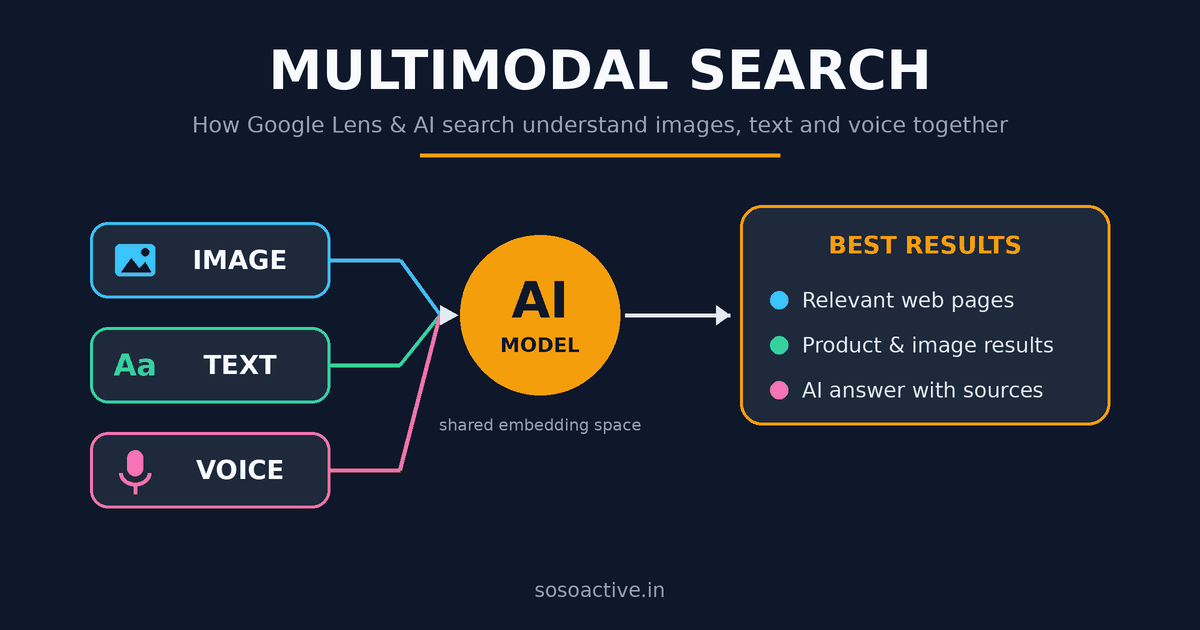
Behind the scenes, the key idea is embeddings. An AI model converts text, images and other content into long lists of numbers called vectors. Items with a similar meaning end up close together in that numeric space.
A multimodal model places text and images in the same shared space. As the OpenSearch guide to multimodal semantic search explains, this makes it possible to search with text and get images back, search with an image and get related text, or mix both in one query.
In simple terms, the process looks like this:
- Input: You give the engine a photo, a spoken question, typed words, or a combination.
- Understanding: AI models identify objects, read text inside images, and interpret the meaning of your words and tone.
- Matching: The engine compares your query’s vector with indexed pages, images and videos to find the closest meaning.
- Ranking: Results are ordered by relevance, often with context such as location or language.
- Answer: You see web results, shopping listings, or an AI-generated summary.
Google describes this direction in its own overview of multimodal generative AI search, where search moves beyond keywords toward understanding images, text and more together.
How Google Lens and AI Search Fit In
Google Lens is the most familiar example. You point your camera at something, and Google identifies it and shows related pages, products or translations. Lens, Circle to Search on Android, image uploads and Chrome’s “Search this image” option are the main ways people start an image-led search.
Voice search adds another layer. Spoken queries tend to be longer and more conversational, so engines rely on natural language understanding rather than exact keyword matching.
AI search ties these inputs together. Features like AI Overviews and AI Mode can take a mix of image and text, understand the intent, and produce a summarized answer with source links.
Why This Matters for Website Owners
Google has made this trend measurable. On September 24, 2026, Google announced multimodal reporting in Search Console, covered on the Google Search Central blog. It separates web searches into text-based and multimodal views, so you can see how often your pages appear when someone searches with an image.
Two details are worth knowing. First, this reporting shows which of your pages appeared, but it does not show the image people searched with. Second, the data currently lives in the Search Console interface rather than the API, according to industry coverage, so check your own property to see whether it has reached you yet.
For anyone building a blog or online business, this means image-led discovery is no longer invisible. You can start tracking it and improving for it, just like regular search traffic.
How to Optimize Your Content for Multimodal Search
You do not need a new strategy. You need to make every format on your page easy to understand. This overview of multimodal search optimization covers the idea in more depth, and these are the practical steps:
- Use original, high-quality images. Clear photos of real products, steps or examples are easier for AI to recognize than generic stock images.
- Write descriptive alt text. Describe what is in the image in plain language, such as “brass table lamp with white shade on a wooden desk,” not “lamp123.”
- Use meaningful file names. Name files by what they show, for example
brass-table-lamp.webp. - Add captions and nearby context. Text around an image helps search engines connect the picture to your topic.
- Support voice queries. Add short FAQ sections that answer questions in a natural, conversational way.
- Use structured data. Product, image and video schema help engines understand what your content contains.
- Keep pages fast. Compress images and use modern formats so mobile users, who do most visual searches, get a quick experience.
- Match your text and visuals. The headline, copy, images and video on a page should all describe the same topic.
If you are building out a content strategy around these ideas, our SEO and digital marketing guides cover related topics you can apply alongside this.
Common Mistakes to Avoid
- Uploading images with empty alt text or random file names
- Using the same generic stock photo as every other site
- Hiding important information only inside images without matching text
- Ignoring mobile performance
- Writing for keywords only, without answering real questions
The Future of Search Is Multimodal
Search is moving from typing queries to showing, speaking and asking in whatever way feels natural. Engines are getting better at understanding what a person means, not just what they type. Websites that offer clear text, helpful images, descriptive markup and honest, original content will be easier for these systems to understand and recommend.
Start small. Audit your top ten pages, fix alt text and file names, add one useful image or short video per post, and check Search Console for multimodal data. Small, consistent improvements now can put you ahead as visual and voice search keep growing.